Grapefruitprincess ReLoaded: Technology
Showing posts with label Technology. Show all posts

Saturday, November 12, 2016

Stockholm Syndrome at the Apple Store // NaBloPoMo


I really feel as if I got hit by some kind of Stockholm syndrome. I've had an appointment at the Genius Bar at the Apple Store today, and it took sooooo darn long... Like, we are talking hours. So I really ended up having a crush on every single male employee in there. Especially the one with the knuckle tats.

My MacBook had this weird thing going on, that the second you plugged something into the USB, it just shut down. Completely. And there was no way to turn it back on but to remove the back cover, unhook the battery, plug it back in, and it would start again. Thank you, YouTube, by the way.

It took a while, but I left with a working MacBook Pro again, plus they "cleaned it up" a little. Meaning it runs smoother and way quicker now. Hallelujah!

Besides the falling in love stuff, I was a little surprised though. None of the (at least) 15 Apple Store employees asked if they can help me when I walked in, obvioulsy carrying a MacBook. No one said "Welcome!" - nada. I walked in there and sat at the Genius Bar for at least 15 minutes waiting for the clock to hit 2:35pm (that's when I was scheduled), before someone FINALLY asked me what's up. Weird weird.

But the guys helping me and my Mac were super nice. So everything is ok. Kinda.

Still... you drop crazy amounts of money in these stores, 

so you'd expect some kind of welcoming atmosphere. No?


NaBloPoMo November 2016
 photo Footer.png
 

Thursday, November 10, 2016

Charger Insanity


Nah, I'm not talking about my football team - but the "Where's my charger?" insanity at home, in the office... Everywhere! Phones, tablets, GoPro, Camcorder. And then you can never find the right charger.

Well - thanks to STCell those days are over. From now on I will have a convenient little charging station, PLUS my devices will be charged superduperfast! Check it out:


Here are some technical facts about the charger:


  • Intelligent Charging Technology - The charger provides the maximum possible current for all USB devices with a output of up to 2.4A per Port.
  • One Super-fast QC2.0 port will charge your modern device up to 75% faster than normal chargers.
  • It takes 30 minutes to charge Samsung S6.
  • QC2.0 Support, Nexus 6, Samsung Galaxy S6/S6 Edge/Edge+, Note 5, Note 4/EdgeSony Xperia Z4, Z4 Tablet, Z3, Z3 Compact, Z3 Tablet Compact, Z2 Tablet, Motorola Droid Turbo, Moto X 2014, HTC One M9, HTC One (M8), One Remix (Verizon Mini 2), Desire EYE, LG G Flex2, G4, Xiaomi Mi3, Mi4, Mi Note, Sharp Aquos.
  • This QC 2.0 port will provide 5 V (blue led), 9V (Ping led) or 12V(Red led) after finding out what your device needs. 
  • Can charge all cell phones including tablets and Bluetooth earphones.
  • Built-in software protects your devices against overcharging, excessive current and overheating.


The charger even comes with a special gift: 2 STCell high quality thick QC2.0 USB cables that charge much faster than other cables as it can easily bare high amperage because of its higher thickness then all normal USB cables. I mean, did you see the "it takes 30 minutes to charge a Samsung S6" part? Awesome! What a time saver!

I'm a girl, so I have to point out the fact that it's rose-gold as well. It looks super pretty on my desk.


NaBloPoMo November 2016


And now for the obvious disclaimer: "I received this charger complimentary from STCell for testing purposes." Yep. Free stuff for me to try and then review... because I'm Anni from the block.

 (This post was endorsed by STCell. I received a product in exchange for my unbiased review. All opinions are my own. Full Disclosure

Friday, October 21, 2016

Have you Talked to your Child today?

I stumbled across this ad campaign today, while browsing through German news sites. It's initiated by an agency for addiction treatment in Germany. And what's pictured below is shockingly true, and I'm sure you can find this on every playground in the USA as well:

via Spiegel.de // Lakost

The wording says: "Have you talked to your child today?" - and this is reality pictured on this poster/ad. Everyone keeps hating on teenagers, saying they are like zombies with cellphones in their hands 24/7. But honestly: some of the parents are no better. At all. I see it at our nursery here. They walk out, holding their child's hand in one, and the cellphone to post workouts on Instagram in the other hand.

Some daycares already banned smartphones on their premises. You can leave your phone in the car for the few minutes it takes to pick up your child.

I am pretty strict when it comes to cellphones around me anyway. Just ask my best friend. His phone kept going off. Notifications every 45 seconds... I was fed up at one point, and ever since then he's putting it on silent. I love that he respects and especially UNDERSTANDS my opinion. You and everyone around you don't need to get an alert every time someone farts on Facebook or posts his food on Instagram.

When you visit me and you are one of those "notification for everything" kind of person, make sure your phone is on vibrate or completely turned off. If you want to have your phone in your hand while talking to me, you can just go back home. Give me your attention. Restaurants? Leave it in your purse. Don't put it on the table. This is called interaction. Real life social life. And people being on their phone all. the. time. ticks. me. off.

This one right here goes especially to the parents though: Put that freaking phone down! Ask your child how his/her day was. Interact with your little ones. Play with them. And don't you DARE using your smartphone as a babysitter! (pet peeve right there)

Are you a "Zombie Parent" as well? Guilty? How do you handle the smartphone overload these days?


 photo Footer.png
 

Tuesday, July 12, 2016

Ooma Telo Sweepstake

This is an update on my Ooma Telo post HERE!


Awesome news: Ooma is putting together a sweepstake where one lucky reader will win an Ooma Telo, one year of Premier Service, a Nest Protect smoke and carbon monoxide detector and a Nest Thermostat. The giveaway will run until July 19th!

Entering is easy:


  1. Just go to HERE where you can use the calculator to determine what you could save on your monthly phone bill in 3 years as well as how long it will take (in months) for Ooma to pay for itself.
  1. Leave the results as a comment below.

I will provide a list of all respondents who correctly followed the instructions to Linqia by July 19th, and Ooma will select one grand prize winner.

GOOD LUCK!

 photo Footer.png
 

Thursday, July 7, 2016

Home Phone Service - AND connected to Home with Ooma Telo

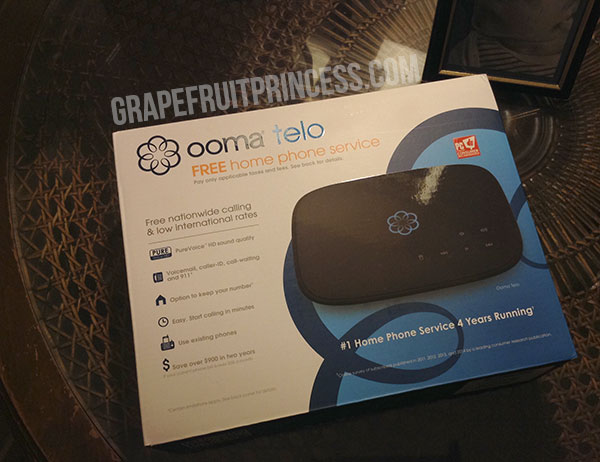
Being an expat makes staying in touch with family and friends back home tough sometimes! Even in the age of cellphones, apps, etc. Especially older generations prefer calling the good old land line. Ooma Telo combines the feeling of exactly THIS with some awesome features: a smarter home phone that will cost you a fraction of the price that you’re paying for your home phone service today. They offer very affordable international calling plans, and by the way are the #1 rated home phone service!

Number 1 Ranked Free Internet Phone Service, Internet phone service, Home Phone Service, VoIP Home Phone Service, Monthly phone savings calculator, International Calling Plans, Ooma Telo, Review

It all starts with a one-time purchase of the Ooma Telo product ($99.99). Afterwards, only applicable taxes and fees are charged on a monthly basis. These range from $4-$7 per month depending on your postal code. More advanced features are available with Premier service ($9.99/month), and are definitely worth it as well!
With Ooma, you’re not just getting a great set of features for your phone, but your Ooma Telo can also seamlessly connect to and interact with your favorite smart home products like Amazon Echo, Nest, Phillip Hue and LIFX smart lightbulbs, and others, making your home safer and more convenient than before. 

For example 
  • Receive a call when smoke or carbon monoxide is detected with the option to connect to local emergency services.
  • Initiate a call or check messages with Amazon Echo’s Alexa voice assistant.
  • Automatically turn on call forwarding when you leave home.
  • Get incoming calls and voicemail notifications on an Apple Watch or Android Wear Watch.
  • Get alerted of incoming phone call or voicemails visually with lights and know if it’s someone you know (Green) vs. someone you don’t (Red).

You can forward your phone calls to your cellphone as well - just use the Ooma app. It's available for iOs and Android!

Setting up your Ooma Telo is as easy as can be. Unpack it, and the very first step is: Activate your Ooma Telo! It is VERY important you do this before anything else. Don't plug your device in or connect it to your router just yet!

The online platform "My Ooma" is awesome! Every step is very well explained. You will get walked through the whole process.

Number 1 Ranked Free Internet Phone Service, Internet phone service, Home Phone Service, VoIP Home Phone Service, Monthly phone savings calculator, International Calling Plans, Ooma Telo, Review

The next step would be connecting your Ooma Telo to your router. Last but not least: Connect your phone and plug in the Ooma Telo power cord. Done!

The manual that comes with your device explains and shows every step very detailed. You should not have any issues connecting it and getting it up and running.

Number 1 Ranked Free Internet Phone Service, Internet phone service, Home Phone Service, VoIP Home Phone Service, Monthly phone savings calculator, International Calling Plans, Ooma Telo, Review

Another great feature is, that you will be able to manually add up to 1,000 phone numbers to your personal blacklist (including the ability to block entire area codes, even toll free area codes)!

Number 1 Ranked Free Internet Phone Service, Internet phone service, Home Phone Service, VoIP Home Phone Service, Monthly phone savings calculator, International Calling Plans, Ooma Telo, Review

You can even keep your home phone number for a $39.99 transfer, or choose your own number in most any available area code for free.

Keep checking your my Ooma portal for new, caller logs, settings, etc. Even if you are not home, you are always in control over your Ooma Telo.

Number 1 Ranked Free Internet Phone Service, Internet phone service, Home Phone Service, VoIP Home Phone Service, Monthly phone savings calculator, International Calling Plans, Ooma Telo, Review


Showing posts with label Technology. Show all posts

Stockholm Syndrome at the Apple Store // NaBloPoMo


I really feel as if I got hit by some kind of Stockholm syndrome. I've had an appointment at the Genius Bar at the Apple Store today, and it took sooooo darn long... Like, we are talking hours. So I really ended up having a crush on every single male employee in there. Especially the one with the knuckle tats.

My MacBook had this weird thing going on, that the second you plugged something into the USB, it just shut down. Completely. And there was no way to turn it back on but to remove the back cover, unhook the battery, plug it back in, and it would start again. Thank you, YouTube, by the way.

It took a while, but I left with a working MacBook Pro again, plus they "cleaned it up" a little. Meaning it runs smoother and way quicker now. Hallelujah!

Besides the falling in love stuff, I was a little surprised though. None of the (at least) 15 Apple Store employees asked if they can help me when I walked in, obvioulsy carrying a MacBook. No one said "Welcome!" - nada. I walked in there and sat at the Genius Bar for at least 15 minutes waiting for the clock to hit 2:35pm (that's when I was scheduled), before someone FINALLY asked me what's up. Weird weird.

But the guys helping me and my Mac were super nice. So everything is ok. Kinda.

Still... you drop crazy amounts of money in these stores, 

so you'd expect some kind of welcoming atmosphere. No?


NaBloPoMo November 2016
 photo Footer.png
 

Charger Insanity


Nah, I'm not talking about my football team - but the "Where's my charger?" insanity at home, in the office... Everywhere! Phones, tablets, GoPro, Camcorder. And then you can never find the right charger.

Well - thanks to STCell those days are over. From now on I will have a convenient little charging station, PLUS my devices will be charged superduperfast! Check it out:


Here are some technical facts about the charger:


  • Intelligent Charging Technology - The charger provides the maximum possible current for all USB devices with a output of up to 2.4A per Port.
  • One Super-fast QC2.0 port will charge your modern device up to 75% faster than normal chargers.
  • It takes 30 minutes to charge Samsung S6.
  • QC2.0 Support, Nexus 6, Samsung Galaxy S6/S6 Edge/Edge+, Note 5, Note 4/EdgeSony Xperia Z4, Z4 Tablet, Z3, Z3 Compact, Z3 Tablet Compact, Z2 Tablet, Motorola Droid Turbo, Moto X 2014, HTC One M9, HTC One (M8), One Remix (Verizon Mini 2), Desire EYE, LG G Flex2, G4, Xiaomi Mi3, Mi4, Mi Note, Sharp Aquos.
  • This QC 2.0 port will provide 5 V (blue led), 9V (Ping led) or 12V(Red led) after finding out what your device needs. 
  • Can charge all cell phones including tablets and Bluetooth earphones.
  • Built-in software protects your devices against overcharging, excessive current and overheating.


The charger even comes with a special gift: 2 STCell high quality thick QC2.0 USB cables that charge much faster than other cables as it can easily bare high amperage because of its higher thickness then all normal USB cables. I mean, did you see the "it takes 30 minutes to charge a Samsung S6" part? Awesome! What a time saver!

I'm a girl, so I have to point out the fact that it's rose-gold as well. It looks super pretty on my desk.


NaBloPoMo November 2016


And now for the obvious disclaimer: "I received this charger complimentary from STCell for testing purposes." Yep. Free stuff for me to try and then review... because I'm Anni from the block.

 (This post was endorsed by STCell. I received a product in exchange for my unbiased review. All opinions are my own. Full Disclosure

Have you Talked to your Child today?

I stumbled across this ad campaign today, while browsing through German news sites. It's initiated by an agency for addiction treatment in Germany. And what's pictured below is shockingly true, and I'm sure you can find this on every playground in the USA as well:

via Spiegel.de // Lakost

The wording says: "Have you talked to your child today?" - and this is reality pictured on this poster/ad. Everyone keeps hating on teenagers, saying they are like zombies with cellphones in their hands 24/7. But honestly: some of the parents are no better. At all. I see it at our nursery here. They walk out, holding their child's hand in one, and the cellphone to post workouts on Instagram in the other hand.

Some daycares already banned smartphones on their premises. You can leave your phone in the car for the few minutes it takes to pick up your child.

I am pretty strict when it comes to cellphones around me anyway. Just ask my best friend. His phone kept going off. Notifications every 45 seconds... I was fed up at one point, and ever since then he's putting it on silent. I love that he respects and especially UNDERSTANDS my opinion. You and everyone around you don't need to get an alert every time someone farts on Facebook or posts his food on Instagram.

When you visit me and you are one of those "notification for everything" kind of person, make sure your phone is on vibrate or completely turned off. If you want to have your phone in your hand while talking to me, you can just go back home. Give me your attention. Restaurants? Leave it in your purse. Don't put it on the table. This is called interaction. Real life social life. And people being on their phone all. the. time. ticks. me. off.

This one right here goes especially to the parents though: Put that freaking phone down! Ask your child how his/her day was. Interact with your little ones. Play with them. And don't you DARE using your smartphone as a babysitter! (pet peeve right there)

Are you a "Zombie Parent" as well? Guilty? How do you handle the smartphone overload these days?


 photo Footer.png
 

Ooma Telo Sweepstake

This is an update on my Ooma Telo post HERE!


Awesome news: Ooma is putting together a sweepstake where one lucky reader will win an Ooma Telo, one year of Premier Service, a Nest Protect smoke and carbon monoxide detector and a Nest Thermostat. The giveaway will run until July 19th!

Entering is easy:


  1. Just go to HERE where you can use the calculator to determine what you could save on your monthly phone bill in 3 years as well as how long it will take (in months) for Ooma to pay for itself.
  1. Leave the results as a comment below.

I will provide a list of all respondents who correctly followed the instructions to Linqia by July 19th, and Ooma will select one grand prize winner.

GOOD LUCK!

 photo Footer.png
 

Home Phone Service - AND connected to Home with Ooma Telo

Being an expat makes staying in touch with family and friends back home tough sometimes! Even in the age of cellphones, apps, etc. Especially older generations prefer calling the good old land line. Ooma Telo combines the feeling of exactly THIS with some awesome features: a smarter home phone that will cost you a fraction of the price that you’re paying for your home phone service today. They offer very affordable international calling plans, and by the way are the #1 rated home phone service!

Number 1 Ranked Free Internet Phone Service, Internet phone service, Home Phone Service, VoIP Home Phone Service, Monthly phone savings calculator, International Calling Plans, Ooma Telo, Review

It all starts with a one-time purchase of the Ooma Telo product ($99.99). Afterwards, only applicable taxes and fees are charged on a monthly basis. These range from $4-$7 per month depending on your postal code. More advanced features are available with Premier service ($9.99/month), and are definitely worth it as well!
With Ooma, you’re not just getting a great set of features for your phone, but your Ooma Telo can also seamlessly connect to and interact with your favorite smart home products like Amazon Echo, Nest, Phillip Hue and LIFX smart lightbulbs, and others, making your home safer and more convenient than before. 

For example 
  • Receive a call when smoke or carbon monoxide is detected with the option to connect to local emergency services.
  • Initiate a call or check messages with Amazon Echo’s Alexa voice assistant.
  • Automatically turn on call forwarding when you leave home.
  • Get incoming calls and voicemail notifications on an Apple Watch or Android Wear Watch.
  • Get alerted of incoming phone call or voicemails visually with lights and know if it’s someone you know (Green) vs. someone you don’t (Red).

You can forward your phone calls to your cellphone as well - just use the Ooma app. It's available for iOs and Android!

Setting up your Ooma Telo is as easy as can be. Unpack it, and the very first step is: Activate your Ooma Telo! It is VERY important you do this before anything else. Don't plug your device in or connect it to your router just yet!

The online platform "My Ooma" is awesome! Every step is very well explained. You will get walked through the whole process.

Number 1 Ranked Free Internet Phone Service, Internet phone service, Home Phone Service, VoIP Home Phone Service, Monthly phone savings calculator, International Calling Plans, Ooma Telo, Review

The next step would be connecting your Ooma Telo to your router. Last but not least: Connect your phone and plug in the Ooma Telo power cord. Done!

The manual that comes with your device explains and shows every step very detailed. You should not have any issues connecting it and getting it up and running.

Number 1 Ranked Free Internet Phone Service, Internet phone service, Home Phone Service, VoIP Home Phone Service, Monthly phone savings calculator, International Calling Plans, Ooma Telo, Review

Another great feature is, that you will be able to manually add up to 1,000 phone numbers to your personal blacklist (including the ability to block entire area codes, even toll free area codes)!

Number 1 Ranked Free Internet Phone Service, Internet phone service, Home Phone Service, VoIP Home Phone Service, Monthly phone savings calculator, International Calling Plans, Ooma Telo, Review

You can even keep your home phone number for a $39.99 transfer, or choose your own number in most any available area code for free.

Keep checking your my Ooma portal for new, caller logs, settings, etc. Even if you are not home, you are always in control over your Ooma Telo.

Number 1 Ranked Free Internet Phone Service, Internet phone service, Home Phone Service, VoIP Home Phone Service, Monthly phone savings calculator, International Calling Plans, Ooma Telo, Review